Clinical Trial Office
Mission Statement: Clinical Trial Office
Welcome! We're here to help support your clinical and human research.
BMC Clinical Trial Office (CTO) serves as a central resource for principal investigators, study staff and departments involved in clinical research and for sponsors seeking to conduct clinical trials at Boston Medical Center. Our CTO pre-award and post-award team(s) supports and advances BMC's mission by providing leadership and expertise in Research, Finance and Administration. In fulfilling this mission, the CTO's primary functions are to:
- Review, negotiate, and approve of protocols that are projected to be IRB: approved, expedited, or exempt AND industry or internally funded (Clinical Trial Agreement,CDA,NDA)
- Support Grants & Contracts on protocols that include human subjects (government agency, subaward, foundation award)
- Oversee document harmonization before final approvals: Informed Consent, Contract, Budget, and Medicare Coverage Analysis
- Ensure accurate clinical research: billing process, charge routing, and pricing
- Coordinate, educate, and train on clinical research requirements within research community and clinical departments.
- Monitor and provide oversight of clinical trial account finances.
BMC Radiology Research Study Form
MCA/VelosCT Determination Checklist Form
Subcontract Request Form (CTO)
VelosCT User Access Request Form
General 14
ClinCard *Card* Pick Up Request Form
ClinCard Participant Information Form (CPIF)
ClinCard Study Setup Request Form
ClinCard User Access Request Form
Environmental Health & Safety Forms
Human Subjects Forms and Guidance
Institutional Biosafety Committee (IBC) Forms
Laboratory Safety Committee Forms
Non-Immigration Visitors (B1, B2, or WT Visas) Form
Radiation Safety Committee Forms
VelosCT is a Clinical Trial Management System (CTMS) used to manage financial, administrative and clinical research activities. The system links study status, patient enrollment, calendars, budgets, and patient status as well as provide a mechanism for budgeting, milestones, A/R management, protocol management, patient recruitment & management, query management, adverse event reporting, etc. It is primarily used for managing clinical research studies utilizing hospital infrastructure with charges posting to SDK or GE.
Getting started:
Complete the following:
If you are unsure as to whether your study should be entered in VelosCT, please first complete the MCA/VelosCT Determination Checklist Form (or contact [email protected]). If your study qualifies for VelosCT, then proceed to steps 1 & 2, if not already completed.
- Watch the following Training Videos (For those who plan to administer studies in VelosCT). Use the VelosCT-Test Study for VelosCT Training Videos when training:
- VelosCT Training Video 1st Section [Introduction]
- VelosCT Training Video 2nd Section [Adding a Study]
- VelosCT Training Video 3rd Section [Adding Participants_Editing Calendars_Reporting]
- VelosCT Training Video 4th Section [Roles&Responsiblities_Status Definitions]
- Related Training Material: Training Session (slides) | VelosCT-Adverse Event Log CribSheet
- Please complete the VelosCT User Access Request Form if you will need access to VelosCT.
VelosCT | INSPIR-II Interface:
The aim of the interface is to help reduce some of the administrative actions required with clinical research studies. Key highlights include:
• Jump-start your new IRB protocol application directly out of VelosCT by sending 12 data fields (one-time) to INSPIR-II and receiving an IRB Protocol Number in return for your study
• Automatically receive IRB protocol status updates, NCT#, and Documents from INSPIR-II in VelosCT (it will auto-archive previously interfaced documents too)
• If your IRB protocol is ceded (e.g WIRB, CIRB, Hummingbird), that number will also come to VelosCT once it's been entered and approved in INSPIR-II (Note: ceded protocols without a corresponding INSPIR-II protocol are not part of the interface)
For more information please read: VelosCT | INSPIR-II Interface Overview and view: VelosCT | INSPIR-II Interface Training Video .
ClinCard is a web-based reloadable debit card program used for research participant payment issuance, tracking, and reporting. Studies must have an active IRB # in order to participate.
Getting started:
It's recommended you include the statement 'participant payments will be made via a reloadable debit card' to the Informed Consent for all new and existing BMC managed projects/proposals (at the time of IRB Protocol Application or Renewal).
Then complete the following:
- Watch a 5-minute ClinCard Training Video
- Read through the ClinCard Departmental User Manual
- Complete and submit the ClinCard User Access Request Form (no physical signatures)
- Complete and submit the online ClinCard *Card* Pick Up Request Form along with attaching the ClinCard Study Setup Request Form and supporting documents (Informed Consent, and Project Budget)
- After submitting these forms, a Clinical Trial Financial Analyst will get your study setup and confirm when you can start using ClinCards to pay your research participants. Questions about the ClinCard program can be sent to [email protected].
Other Related Links:
- Research Participant CPIF/W-9 Repository [Restricted Access]
- ClinCard Participant Information Form (CPIF)
- ClinCard Return Slip
- BMC ClinCard Quick Reference Guide
- BMC ClinCard Cardholder FAQ
- BMC ClinCard Reference Guide Approver Role
- BMC ClinCard Reference Guide Report Viewer
- BMC ClinCard Reference Guide Site Coordinator
Lawson is BMCs' Enterprise Resource Planning financial system of record. It's primary functions include: reporting, online check requisitioning and purchase order creation.
Getting started:
- You must have a Windows Operating System and Internet Explorer to use Lawson.
- You must have a valid BMC login to gain access to Lawson. If you do not have one, please contact the BMC IT (4-4500).
To request access, go to the FIS User Access Forms page and select from one of the three research-related options on the right:
- LBI Reports User Request Form "Research" (for Finance Reporting).
- LBI Report User Request Form "Hospital and other Non-Grants" (Use this form to request the VelosCT Reporting Dashboard)
- Lawson Requisition Center User Request Form (for creating Purchase Orders).
- Online Check Request Authorization Form
Most Commonly Asked
What do I do if I want to speak to a company about a protocol/clinical trial?
If the protocol is a corporate-sponsored clinical trial and the PI received a CDA from the corporate sponsor, The CDA should be forwarded to the Contract Attorney in the Clinical Trial Office for processing. If the protocol is PI initiated and the PI is seeking funding from an outside sponsor, the PI should contact the Contract Attorney to discuss options.
How do I get started on a clinical trial agreement?
The first step is to complete an MCA/VelosCT Determination Checklist. The questions on the checklist will allow the Clinical Trial Office (CTO) to complete an initial assessment of what type of study or trial is being contemplated and if the participants and study activities will need to be captured in our Clinical Trial Management System – VelosCT.
The CTO will provide a response to the MCA/VelosCT Determination Checklist and request that you set up your study/trial in VelosCT for management of the contract negotiation. Once the draft, or final, protocol, draft Clinical Trial Agreement (CTA), draft budget and draft ICF are uploaded, and study summary and more study details are completed, then a Study Initiation eForm should be completed. This will trigger an email notification to the CTO Inbox, and the CTO will begin the process of reviewing the documents, beginning the coverage analysis and initiating the contract negotiation.
Why do I need to do an MCA/VelosCT checklist?
The MCA/VelosCT checklist provides the details needed for that first assessment of what type of study/trial you are interesting in being a site for, and allows us to analyze whether our CTMS – VelosCT will be utilized.
What is a Medicare Coverage Analysis?
The coverage analysis, or Medicare coverage analysis, is a tool created to document the protocol defined clinical services and research administrative services that will occur in the clinical trial. Using the CMS Clinical Trial Policy, and the sponsor's offer, each clinical service is defined with regard to its status regarding billing to Medicare (and third party payers). The coverage analysis is an important component in the accurate and compliant billing of research clinical services.
Why do I need to use VelosCT for my clinical trial?
To meet the requirement to oversee and accurately bill for research clinical services BMC uses VelosCT, a clinical trial management system, that allows for participants and event management. This enhances the overall level of accuracy of billing of research services and supports billing compliance.
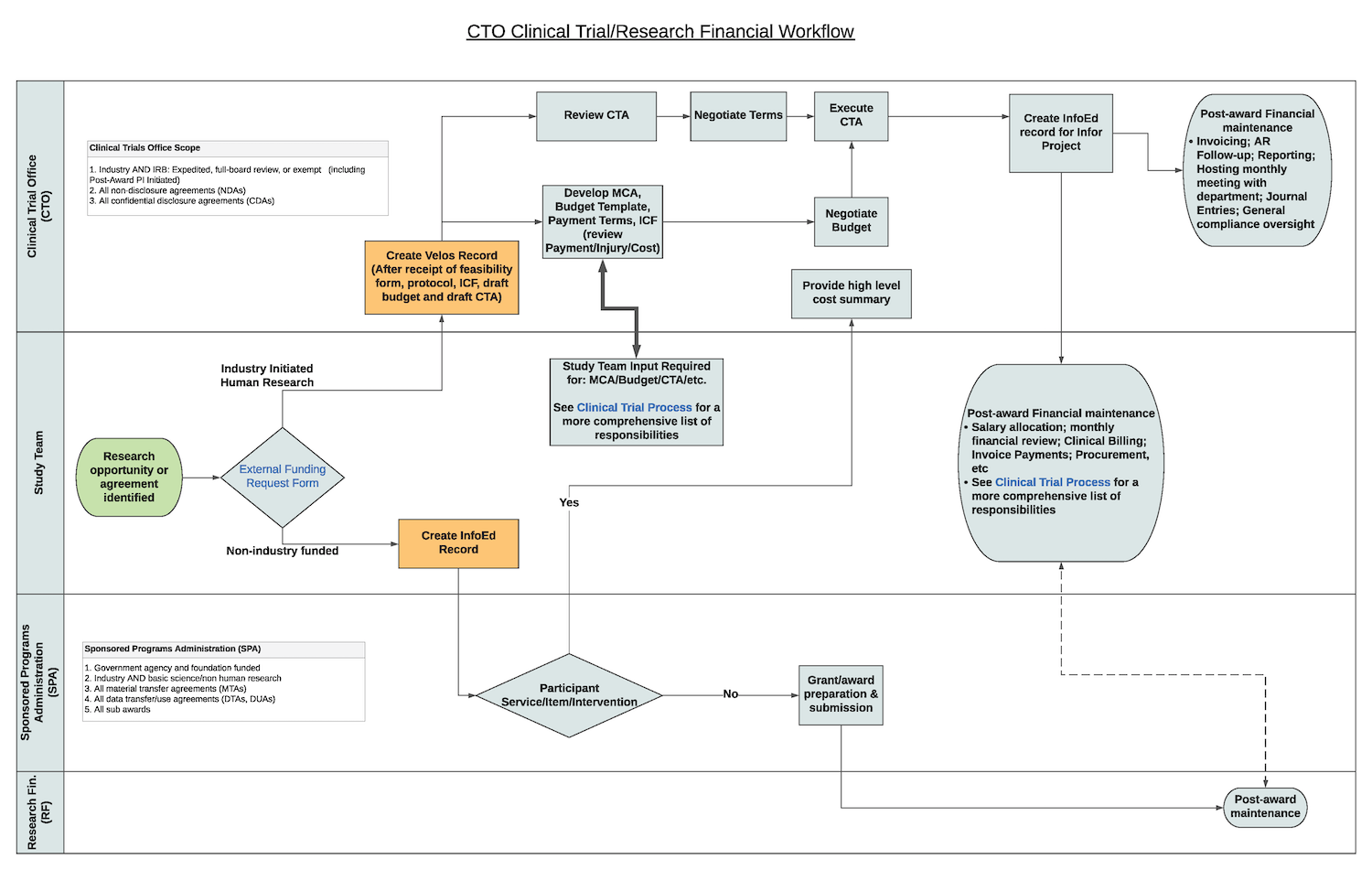
What is the process of getting a clinical trial agreement executed?
How do I gain access to and run research-based reports?
Request a Lawson LBI user account by visiting the FIS User Access Forms page and selecting the LBI Reports option for "Research" for Finance/Grants reporting.You may also select the "Hospital/Non-Grant" option if you need access to VelosCT reports for Clinical Trials.
To run VelosCT reports, please see the VelosCT-Reports User Guide
To run Lawson reports, please see the Lawson Reports Guide
General
Is there ClinCard documentation for participants?
Please see BMC ClinCard Cardholder FAQ
Compliance Related
Office of Human Research Affairs: FAQ's - Quality Assurance Reviews
Office of Human Research Affairs: FAQ's - Research Participants
Institutional Policies 16
Clinical Trials Registration and Reporting (ClinicalTrials.gov)
Contractual Agreements-BMC Subcontractor
Facility and Administrative Costs
Independent Contractor/Consultant Agr.
Purchasing/Materials Management
Standard Operating Procedures 3
Training 8
Human Subject Training Certificates (BU Medical Campus site)
VelosCT Training Video 1st Section [Introduction]
VelosCT Training Video 2nd Section [Adding a Study]
VelosCT Training Video 3rd Section [Adding Participants_Editing Calendars_Reporting]
VelosCT Training Video 4th Section [Roles&Responsiblities_Status Definitions]
VelosCT-Adverse Event Log CribSheet
General 8
BMC ClinCard Quick Reference Guide
BMC ClinCard Reference Guide Approver Role
BMC ClinCard Reference Guide Report Viewer
BMC ClinCard Reference Guide Site Coordinator
ClinCard Departmental User Manual