

What you will learn
What is a proxy?
A proxy is someone who is authorized to access another patient’s MyChart account to help them manage their healthcare. You may choose to assign someone to be your proxy if you would like assistance managing your healthcare. You may also want to be a proxy for a child, parent, and someone else in your life who needs help. A proxy can be a spouse, family member, friend, caregiver, legal representative, or anyone else the patient trusts.
In this challenge, you will learn how to:
- Invite someone to see your health information
- Switch between your account and a family member’s account
- Tell whose records you are looking at
Watch & Learn
There are four topics here to help you understand and use proxy access. If you are on a computer, select each topic by clicking on it. If you are on a phone, use the drop down to select each step.
When you have proxy access to another patient’s account, you can do many of the same things they can do, including:
- See their appointments and schedule new ones
- Read their test results
- Request medication refills
- Send messages to their doctor on their behalf
- View their billing information
To request proxy access, the patient must contact their primary care physician. For example, if you would like to access your mother's records, she must contact her provider and request that access. Or, if you would like someone else to see your records, you must call your provider.
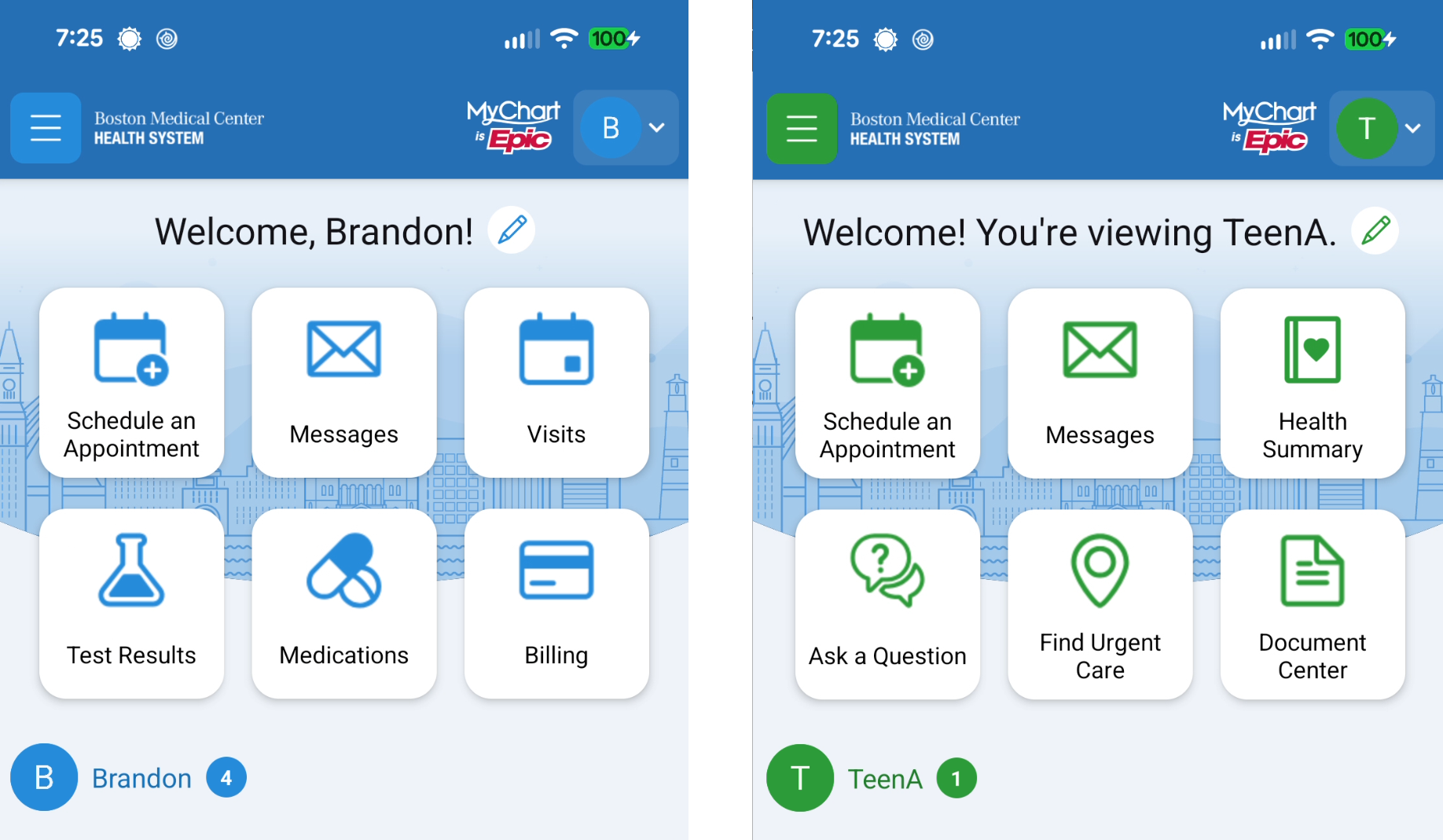
Once you have proxy access to another person's account, you will be able to see their information when you log in to your MyChart.
Step 1: Look at the top right corner of the screen. You will see your initial or the initial of the person whose records you are viewing. Tap that initial icon.
Step 2: A list of linked accounts appears. Tap the name of the person you want to view.
Always check the name at the top of the screen before you do anything to be sure you are on the correct account. This is especially important before scheduling appointments, sending messages, or requesting refills — make sure you are in the right person's account.
Do it yourself
If you need proxy access for a family member, be sure you can do these things. If you do not need proxy access right now, that is OK. You know where to find it when you do.
I can request proxy access for myself or someone else.
I can switch between accounts when I have proxy access to other accounts.
I can tell whether I am looking at my own information or someone else's.
Survey
Your answers to these questions will help us make the toolkit better for everyone.
Need help right now?
For assistance with MyChart, call BMC MyChart Support at 844-635-1390 or ask your clinic staff at your next visit. For telehealth support, call 617-638-6870 or 423-207-4554.
If you need help with food, housing, transportation, or other social services, visit massthrive.org to find a directory of programs available in your area in more than 100 languages, or dial 2-1-1 from any phone to be connected to local services for food, shelter, and more.
*All images are AI-generated.