
Schedule a visit
Depending on your doctor and the type of visit, MyChart will either let you book the appointment yourself or send a request to the office for you.
Step 1: On the home screen, tap the Schedule an Appointment tile.
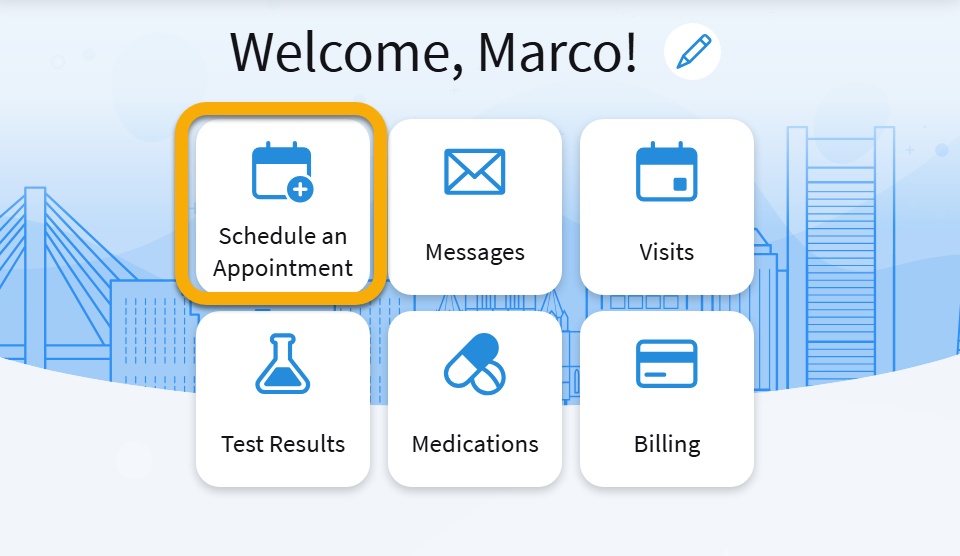
Step 2: Choose the provider you wish to see.
Step 3: Choose your appointment type.
Step 4: What you see next depends on the visit.
- If you see open times, pick one and tap Schedule it. Your visit is booked when you see "Visit scheduled."
- If you see a form asking which days and times work for you, fill it in and tap Send request. This does not mean your appointment is scheduled. The office will call you to confirm. If you don't hear from them within a few days, call the office.
NOTE: If you are not a BMC patient, you may not see a tab for Schedule a New Appointment. You can select Visits and then find the tile for Schedule Appointment.
If you don't see these options, it means you cannot schedule through MyChart. You must call your doctor's office to schedule an appointment.
Check in early with eCheck-In
eCheck-In is a tool that lets you fill out forms and answer health questions on your phone before your appointment starts. This saves you time on the day of your visit.
During eCheck-In, you may be asked to:
- Confirm your name, address, and phone number
- Answer questions about your health and medications
- Confirm your insurance information
- Answer questions about allergies and current health issues
- Pay a visit copay (if required)
You should do your eCheck-In up to 7 days before your appointment. If you wait until your appointment starts, you may be late for your doctor.